Use Git Sparse-Checkout to Scope Agent Worktrees
Learn how to limit the working-tree paths visible to a coding agent using Git worktrees and sparse-checkout, while keeping workspace visibility distinct from security enforcement.
Table of Contents4 sections
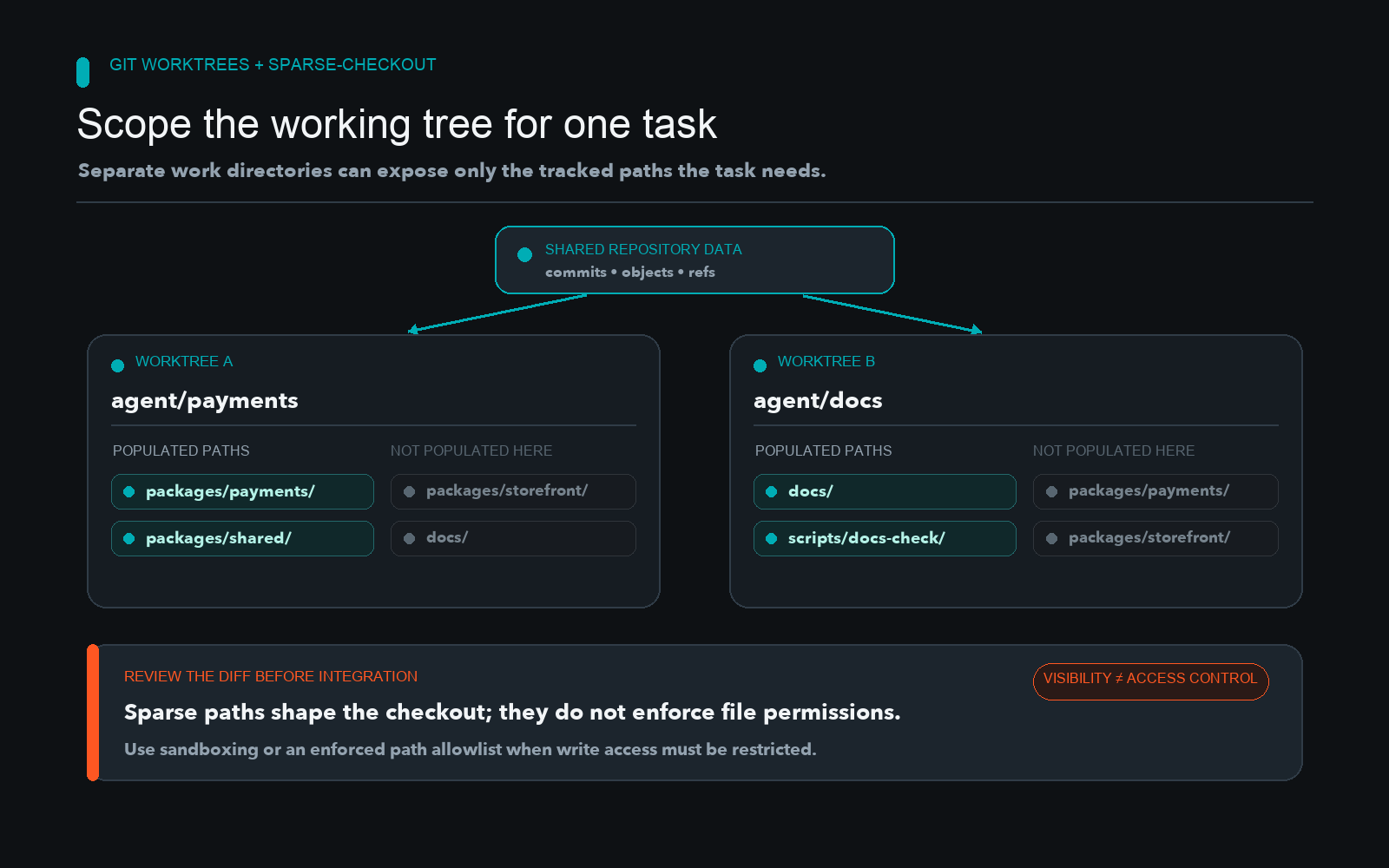
A coding agent assigned to one package may not need every sibling directory in a large repository working tree. Git worktrees provide separate working directories associated with one repository, while sparse-checkout limits which tracked paths are populated in a particular working tree.
Quick solution:
git worktree add -b agent/payments ../agent-payments main
cd ../agent-payments
git sparse-checkout init --cone
git sparse-checkout set packages/payments packages/shared
git sparse-checkout list
git status --short
Setting Up Scoped Worktrees
When managing large monorepos, populating every single directory for every agent task consumes unnecessary disk space and adds noise to the agent context. You can isolate tasks by combining worktrees with path restrictions. Start with a dedicated branch and worktree, then configure the specific paths the task needs.
In cone mode, account for root-level files and the selected directories when reviewing what appears in the working tree. Add only the build, test, and shared files the task requires. The official Git sparse-checkout documentation describes pattern behavior and cone mode operations. Additionally, the Git worktree documentation explains linked working directories and shared repository data, while the GitHub sparse-checkout guide provides broader monorepo context.
Keeping Visibility Separate from Enforcement
Sparse-checkout is a workspace convenience, not a security boundary. An agent or tool with repository access can change sparse patterns or use Git commands to inspect other tracked content. If a task must not modify unrelated paths, enforce a separate allowlist in the integration system and reject any diff that changes paths outside the task approved set. Protect credentials and sensitive files with actual access controls or sandboxing rather than relying on workspace population rules.
A diff allowlist can catch an out-of-scope change before integration. It does not prevent the agent from reading or attempting to edit that file earlier, so treat it as a merge gate rather than a permission system.
Verification Checklist
- Confirm the worktree uses the intended branch and base commit.
- List the sparse paths and inspect which root files remain present.
- Run the required build and tests in that worktree.
- Compare the final diff to a separately enforced path allowlist.
- Record measured file or context changes only when the measurement method is reproducible.
Continue Exploring
You Might Also Like

Debugging Silent Skips in Poll-Based Reply Bots
An analysis of why poll-based reply bots fail silently in production due to bare continue statements and fixed lookback windows, with architectural solutions for structured skip reporting.

Managing Agent Worktrees in Git
An architectural guide on how to safely manage cleanup and ephemeral lifecycles for parallel AI coding agents in Git worktrees without corrupting shared reflogs.

Bounded LLM Fallback Chains
Learn how to build bounded LLM fallback chains that prevent cost overruns, respect rate limits, and stop on billing errors.