When to Modularize an Android App Without Overengineering
A practical guide to deciding when Android modules help, what boundaries to extract first, and how to avoid turning modularization into architecture overhead.
Table of Contents15 sections
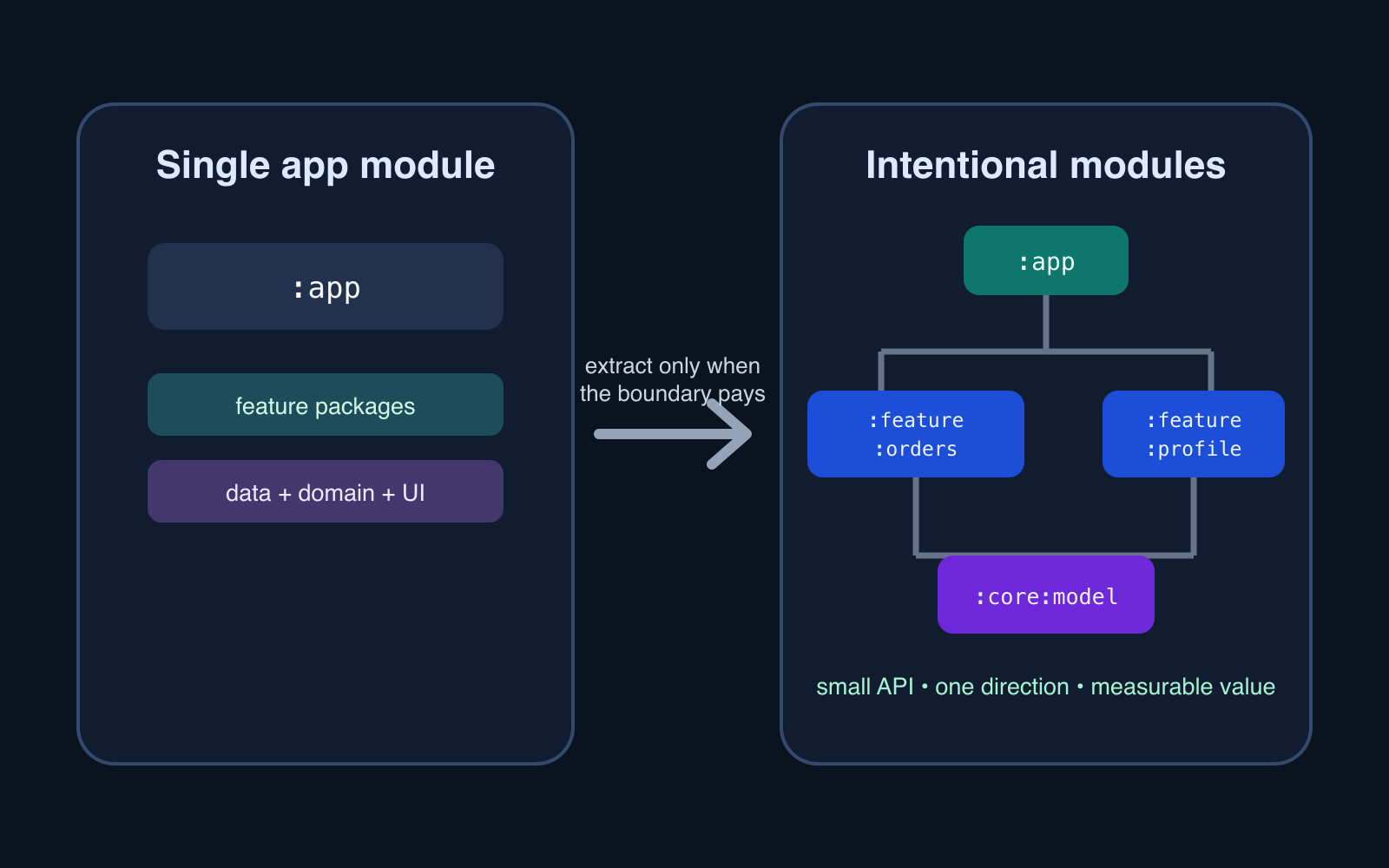
Android modularization is useful when a module creates a real boundary: ownership, build isolation, reuse, dependency control, or a feature that can evolve independently.
It is not useful merely because the project has grown beyond a few packages.
That distinction matters. Splitting one application into twenty Gradle modules can make the architecture diagram look cleaner while making dependency wiring, navigation, test setup, and build configuration harder to understand. The goal is not to maximize module count. The goal is to make change safer and cheaper.
A practical rule is:
Start with packages. Extract a Gradle module only when the boundary pays for itself.
This guide shows how to recognize that point and how to modularize incrementally.
Packages and modules solve different problems
A package organizes code. A Gradle module creates a build boundary.
That boundary can provide independent compilation, explicit dependencies, separate resources, and clearer visibility between parts of the application. Android Studio’s project documentation describes modules as discrete units of source files and build settings that can be built, tested, and debugged independently.
That power also adds cost.
A module may introduce:
- another Gradle configuration surface;
- dependency declarations;
- public APIs between modules;
- resource ownership decisions;
- test fixtures or fakes;
- navigation integration;
- dependency injection wiring.
If none of those boundaries solve a current problem, a package may be enough.
Do not modularize by screen count
A common trigger is:
"We have 20 screens now, so we need 20 modules."
Screen count is a weak signal.
A better set of signals is:
| Signal | What it tells you |
|---|---|
| Teams frequently edit the same files | Ownership boundaries are weak |
| Unrelated features depend on each other’s implementation | Dependency boundaries are weak |
| A reusable capability has multiple consumers | A shared module may have real value |
| Feature tests require constructing most of the app | Isolation is poor |
| Build changes invalidate large unrelated areas | Compilation boundaries may help |
| One feature needs independent delivery or replacement | A feature boundary may be justified |
The important question is not “How large is the app?” It is “Which changes are coupled that should not be?”
Begin with one application module
For a small product, a single :app module with disciplined packages is often the cheapest architecture:
app/
  feature/
    home/
    orders/
    profile/
  data/
  domain/
  ui/
This is not an architectural failure.
You can still enforce repository boundaries, use cases, immutable UI state, and feature ownership inside one module. The patterns in Android ViewModel Partial Success: Separate Write Success from Refresh Failure are useful regardless of whether the ViewModel and repository live in one Gradle module or several.
Modularization should come after the logical boundaries become clear enough to extract.
Extract a feature when it has a stable edge
Suppose an orders feature contains:
OrderScreen
OrderViewModel
OrderUiState
SubmitOrderUseCase
OrderRepository interface
It becomes a good extraction candidate when most of its interactions with the rest of the app can be expressed through a small contract.
For example:
interface OrdersEntryPoint {
    fun openOrder(orderId: String)
}
The feature should not need direct access to every other feature’s ViewModel, database implementation, or navigation internals.
A healthy feature boundary looks more like:
:app
  -> :feature:orders
  -> :feature:profile

:feature:orders
  -> :core:model
  -> :core:ui
  -> :orders-data
and less like:
:feature:orders
  -> :feature:home
  -> :feature:profile
  -> :feature:history
  -> :app
If feature modules depend on one another in every direction, the project has moved package coupling into Gradle instead of removing it.
Extract shared code only after it is actually shared
The easiest module to create is often :core.
It is also one of the easiest modules to ruin.
A generic core module can become a dumping ground for:
StringUtils
DateUtils
BaseViewModel
CommonRepository
RandomExtensions
EverythingManager
A better approach is to name modules after a cohesive responsibility:
:core:model
:core:ui
:core:network
:core:testing
Create them when multiple consumers need the capability and the dependency direction is clear.
Android’s library-module documentation explicitly calls out shared components and multiple app variations as reasons to use Android libraries. That is stronger justification than “this class feels reusable someday.”
Do not extract speculative reuse.
Keep dependency direction boring
Good modular architecture is usually easy to draw.
app
 |
 +--> feature:orders ----+
 |                       |
 +--> feature:profile ---+--> core:model
 |                       +--> core:ui
 +--> feature:history ---+--> core:network
The app assembles features. Features depend on stable shared capabilities. Shared modules do not know about individual features.
When dependencies form a circle, stop and inspect the contract:
feature:a -> feature:b -> feature:a
Typical fixes include:
- move a genuinely shared model into a neutral module;
- expose a small feature API instead of implementation classes;
- let the app layer coordinate cross-feature navigation;
- replace direct feature calls with an interface owned by the consumer.
Do not solve cycles by creating a :common module that simply contains both sides.
API and implementation splits are an advanced tool
Some large applications split a feature into:
:feature:profile:api
:feature:profile:impl
The API module contains the contract. The implementation module contains the UI and internal behavior.
Android’s current Navigation 3 modularization guidance demonstrates this pattern for navigation keys and feature entry providers.
It can be powerful when many modules need to navigate to a feature without depending on its implementation.
It can also double the number of modules.
Use it when the dependency graph needs that separation, not as a default template for a three-feature application.
Build speed is evidence, not folklore
“More modules make builds faster” is incomplete.
Modules can improve incremental builds when they reduce the amount of code invalidated by a change. But every module also adds configuration and dependency-graph work.
Measure before restructuring for performance.
Record a repeatable workflow such as:
clean build
small Kotlin implementation change
resource-only change
feature API change
test compilation
Then compare the same scenarios after an extraction.
If the architecture becomes harder and the measured build feedback does not improve, the module split did not achieve its stated goal.
The same principle applies to runtime optimization: measure Android performance instead of assuming a refactor helped.
Keep feature resources close to the feature
A useful module boundary owns more than Kotlin files.
If an orders feature is independent, its strings, icons, layouts, previews, and feature-specific test data should usually move with it.
That improves discoverability:
feature/orders/
  src/main/
    kotlin/
    res/
  src/test/
But avoid moving globally shared design tokens into every feature. Shared UI primitives belong in a deliberate design-system or UI module once multiple features actually depend on them.
The ownership rule is simple:
Put a resource where the behavior that gives it meaning is owned.
Navigation is where weak boundaries become visible
Cross-feature navigation often reveals whether modularization is real.
A feature should not need to understand another feature’s internal screen hierarchy. Prefer a stable route or navigation contract.
For larger Navigation 3 projects, Android documents an API/implementation pattern where feature API modules expose navigation keys and implementation modules contribute entries to the application’s navigation graph.
For smaller projects, the same idea can remain simpler:
sealed interface AppDestination {
    data object Orders : AppDestination
    data class OrderDetail(val id: String) : AppDestination
}
The app-level navigation layer can map those destinations to feature content.
Do not introduce a navigation framework merely to justify modules. Use the smallest contract that prevents implementation leakage.
Tests should become easier after extraction
A module boundary should make at least some tests cheaper to run and easier to construct.
A feature unit test should not require:
real database
real network client
main activity
other feature ViewModels
full navigation graph
If extraction creates more test scaffolding than isolation, inspect the public API.
Useful module-level tests include:
- ViewModel state transitions;
- use-case orchestration;
- repository contracts;
- mapping logic;
- navigation contract serialization;
- feature-specific Compose tests.
A good boundary reduces the number of things a test needs to know.
A practical extraction order
For an existing single-module app, avoid a big-bang rewrite.
A safer sequence is:
1. Fix package boundaries first
Make ownership visible inside :app.
feature/orders
feature/profile
core/model
core/ui
data/orders
Remove obvious cross-feature implementation access.
2. Pick one low-coupling feature
Choose a feature with a small public edge and few dependencies.
Do not begin with the most entangled feature in the application.
3. Extract its supporting contract
Move only what the feature actually needs.
If ten unrelated helpers suddenly have to move too, that is evidence that the logical boundary needs more work.
4. Verify build and tests
Run the feature tests, application tests, and release build.
Also verify resources, dependency injection, deep links, and navigation.
5. Observe the dependency graph
Ask whether the extraction reduced coupling or merely relocated it.
6. Repeat only when the next boundary has value
One successful module does not mean every package should become one.
A decision checklist
Create a new module when several of these are true:
- the code has a cohesive responsibility;
- multiple developers or teams benefit from ownership isolation;
- the boundary has a small, stable API;
- consumers should not see implementation details;
- the code has meaningful independent tests;
- the code is reused by more than one consumer;
- build invalidation is measurably expensive;
- the feature may need separate delivery or replacement.
Stay with packages when most of these are true:
- the code changes together;
- the proposed module has only one tiny consumer;
- its public API would expose implementation details;
- the split creates circular dependencies;
- the motivation is only visual cleanliness;
- nobody has measured the build problem;
- the architecture would require many pass-through modules.
The target is change isolation
The best modular Android architecture is not the one with the most boxes.
It is the one where an engineer can change one feature and confidently predict what else might break.
Start with clear package ownership. Extract one boundary when there is evidence that a Gradle module will improve isolation, reuse, testing, ownership, or delivery. Keep dependencies directional. Measure build claims. Let the module graph grow only as fast as the product’s real boundaries become clear.
That produces something more useful than a perfectly symmetrical architecture diagram: a codebase that can change without making every change everyone’s problem.
Continue Exploring
You Might Also Like

Android elapsedRealtime and Monotonic Deadlines
Learn how to use Android elapsedRealtime and Kotlin cancellation to reject late coroutine responses during startup health checks, preventing stale data from overwriting UI state.

CameraX ZXing YUV rowStride pixelStride crop QR scanner
Learn how row stride, pixel stride, crop bounds, and rotation interact when feeding CameraX YUV frames into ZXing, and ensure proper proxy lifecycle management.

Fix Firebase Variant CI Configuration
Learn how the Google Services Gradle plugin matches build variants to configuration files, where variant-specific JSON files live, and how to verify that your CI pipeline exercises the intended Firebase project.