Parallelize Independent Android Refreshes with Coroutines
Learn when Android repository calls can run concurrently, how structured concurrency changes failure behavior, and how to test parallel refreshes safely.
Table of Contents16 sections
Coroutines Parallel Refresh Golden Rules
- Use
coroutineScope { ... }withasync: Decompose independent network calls into parallel deferred jobs:val a = async { api.getA() }andval b = async { api.getB() }, thenawaitAll(a, b).- Fail-Fast vs Partial Success: If failure in
getB()must not cancelgetA(), wrap individual calls withrunCatchingor usesupervisorScopeinstead of standardcoroutineScope.- Never Launch Unscoped Jobs: Always bind refresh coroutines to
viewModelScopeso network cancellations execute deterministically on ViewModel teardown.
Independent network or database reads should run concurrently in Android only when they are truly independent and their failure semantics are explicit.
That sounds obvious, but refresh code often grows one repository call at a time:
val profile = repository.getProfile()
val orders = repository.getOrders()
val inventory = repository.getInventory()
If each call waits on I/O and none depends on the previous result, this structure serializes latency for no product reason. Kotlin coroutines give you a better option, but async is not a blanket performance switch. The useful pattern is structured parallel decomposition: start independent work inside a bounded scope, await its results, and deliberately choose whether one failure should cancel the rest.
This guide shows how to do that without turning a ViewModel into a race-condition factory.
Start with dependency, not syntax
Before changing code, draw the work as dependencies.
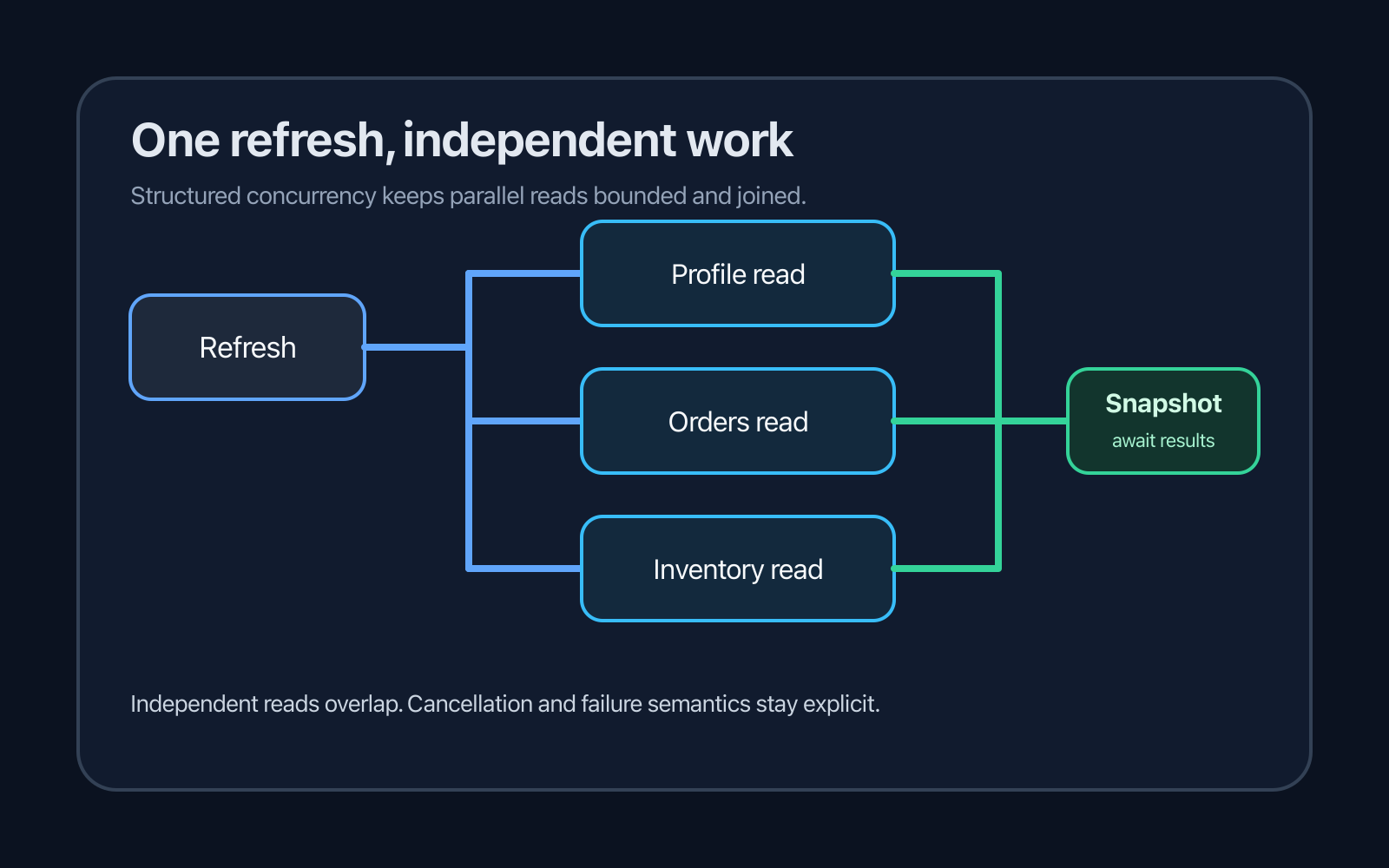
A dashboard refresh might look like this:
refresh
  +-- profile
  +-- orders
  +-- inventory
Those three reads can potentially overlap.
A different workflow might be:
refresh
  +-- session
        +-- account(session.userId)
              +-- recommendations(account.segment)
That chain is sequential because each step needs data from the previous one. Replacing it with async would not make the dependencies disappear.
A practical test is:
Could operation B start with exactly the same inputs if operation A had not completed yet?
If yes, concurrency may reduce wall-clock latency. If no, keep the dependency explicit.
Use structured concurrency for parallel reads
Android’s coroutine performance guidance recommends async for parallel decomposition inside another coroutine or suspending function.
A small use case can own that orchestration:
data class DashboardSnapshot(
    val profile: Profile,
    val orders: List<Order>,
    val inventory: Inventory,
)

class RefreshDashboardUseCase(
    private val repository: DashboardRepository,
) {
    suspend operator fun invoke(): DashboardSnapshot = coroutineScope {
        val profile = async { repository.getProfile() }
        val orders = async { repository.getOrders() }
        val inventory = async { repository.getInventory() }

        DashboardSnapshot(
            profile = profile.await(),
            orders = orders.await(),
            inventory = inventory.await(),
        )
    }
}
coroutineScope is important. The child coroutines belong to the refresh operation. The parent does not complete until its children complete, and cancellation stays connected to the caller.
Kotlin’s structured concurrency documentation describes this parent-child relationship as the mechanism that makes cancellation and lifetime predictable.
Avoid solving this with an application-wide scope just because it is easy to access. A screen refresh normally should not outlive the operation that requested it.
Keep the ViewModel responsible for screen work
Android’s coroutine best practices recommend that ViewModels create coroutines for business operations and expose observable state.
That produces a simple boundary:
class DashboardViewModel(
    private val refreshDashboard: RefreshDashboardUseCase,
) : ViewModel() {

    private val _uiState = MutableStateFlow(DashboardUiState())
    val uiState: StateFlow<DashboardUiState> = _uiState

    fun refresh() {
        viewModelScope.launch {
            _uiState.update { it.copy(isRefreshing = true) }

            runCatching { refreshDashboard() }
                .onSuccess { snapshot ->
                    _uiState.value = DashboardUiState(
                        profile = snapshot.profile,
                        orders = snapshot.orders,
                        inventory = snapshot.inventory,
                        isRefreshing = false,
                    )
                }
                .onFailure { error ->
                    _uiState.update {
                        it.copy(
                            isRefreshing = false,
                            refreshError = error.message,
                        )
                    }
                }
        }
    }
}
The UI says “refresh.” The ViewModel owns the lifecycle. The use case owns the parallel decomposition. The repositories own data access.
This separation also makes the concurrency policy testable without a Compose test.
async changes failure behavior too
The biggest mistake is thinking only about speed.
With regular structured concurrency, a failure in one child cancels the scope and its siblings. That is correct when the result is all-or-nothing.
Imagine a payment summary that requires all three values to be internally consistent:
account balance
pending transactions
credit limit
If one component cannot be loaded, presenting a mixed snapshot may be misleading. Fail-fast behavior can be the right product decision.
For an informational dashboard, the semantics may be different. A profile failure does not necessarily make cached orders useless.
So decide the contract before choosing the coroutine primitive.
All-or-nothing refresh
Use regular coroutineScope when every result is required:
suspend fun loadRequiredSnapshot(): Snapshot = coroutineScope {
    val account = async { repository.getAccount() }
    val limits = async { repository.getLimits() }

    Snapshot(
        account = account.await(),
        limits = limits.await(),
    )
}
If either child fails, the refresh fails.
This is compact because the product semantics and coroutine semantics match.
Partial results need explicit modeling
Do not switch to supervision and then silently ignore errors. If partial data is useful, model partial data.
One approach is to make each child return a Result:
data class DashboardRefresh(
    val profile: Result<Profile>,
    val orders: Result<List<Order>>,
    val inventory: Result<Inventory>,
)

suspend fun refreshDashboard(): DashboardRefresh = supervisorScope {
    val profile = async { runCatching { repository.getProfile() } }
    val orders = async { runCatching { repository.getOrders() } }
    val inventory = async { runCatching { repository.getInventory() } }

    DashboardRefresh(
        profile = profile.await(),
        orders = orders.await(),
        inventory = inventory.await(),
    )
}
Now the caller cannot accidentally pretend every section succeeded.
The UI state can preserve usable information:
data class DashboardUiState(
    val profile: Profile? = null,
    val orders: List<Order> = emptyList(),
    val inventory: Inventory? = null,
    val profileError: Boolean = false,
    val ordersError: Boolean = false,
    val inventoryError: Boolean = false,
    val isRefreshing: Boolean = false,
)
This is closely related to the principle in How to Handle Partial Success in Android ViewModels: a later failure should not rewrite the truth about work that already succeeded.
Concurrency does not remove that rule. It makes the rule more important.
Do not parallelize writes casually
Three independent reads are often safe to overlap. Three writes deserve much more scrutiny.
Consider:
async { repository.updateOrder(order) }
async { repository.updateInventory(stock) }
async { repository.writeAuditLog(event) }
The calls may be technically independent but not business-independent. What happens if the order and inventory writes succeed while the audit write fails? What can be retried safely? Does the backend provide a transaction or idempotency key?
Parallel writes can create a distributed partial-success problem that the client cannot repair.
Prefer server-side transactions for atomic business operations. If writes are genuinely independent, document their retry and idempotency contracts before parallelizing them.
Do not add a dispatcher without evidence
Suspending network clients and database APIs often already move blocking work off the main thread or expose non-blocking APIs. Adding withContext(Dispatchers.IO) around every suspend function is not automatically useful.
Dispatcher ownership belongs near the code that performs blocking work.
A repository wrapping a blocking SDK may need an injected IO dispatcher:
class LegacyRepository(
    private val ioDispatcher: CoroutineDispatcher,
    private val client: BlockingClient,
) {
    suspend fun load(): Data = withContext(ioDispatcher) {
        client.load()
    }
}
The use case that coordinates several repositories should not need to know which implementation blocks.
This keeps execution policy close to the implementation and makes dispatchers replaceable in tests.
Measure the actual latency
If three independent calls take roughly 400 ms, 500 ms, and 700 ms, sequential execution can approach the sum of those waits. Concurrent execution can approach the slowest branch plus scheduling and processing overhead.
That is a model, not a promise.
Real latency also depends on connection pooling, server limits, database locks, rate limits, CPU work, caching, and device conditions. Measure the complete user-visible operation before and after the change.
For repeatable measurement, use the same discipline as Reliable Android Benchmark Automation: define the scenario, control the environment as much as possible, and compare evidence rather than intuition.
Avoid accidental request storms
Parallelism can improve one refresh and overload a backend when multiplied across the app.
A screen that starts six calls on every resume, plus pull-to-refresh, plus retry, can produce overlapping refresh generations.
Protect the operation at the intent boundary.
For example, ignore a duplicate refresh while one is active:
fun refresh() {
    if (uiState.value.isRefreshing) return

    viewModelScope.launch {
        // perform one refresh generation
    }
}
Or keep a Job and cancel the stale generation when newer data should win:
private var refreshJob: Job? = null

fun refresh() {
    refreshJob?.cancel()
    refreshJob = viewModelScope.launch {
        // newest refresh owns the state update
    }
}
Those policies mean different things. Ignoring duplicate intent favors completion. Cancel-and-replace favors freshness. Pick one deliberately.
Keep concurrency bounded
async over a collection is concise:
val details = ids.map { id ->
    async { repository.getDetail(id) }
}.awaitAll()
It can also start hundreds of requests at once.
When input size is unbounded, concurrency must be bounded too. Options include batching, a semaphore, or moving aggregation to a backend endpoint designed for it.
The key distinction is between a known small fan-out, such as three dashboard sections, and arbitrary fan-out based on user or server data.
Do not use the same implementation for both.
Test concurrency without sleeping
A refactor is not complete when it looks concurrent. Verify it.
Android’s coroutine testing guide recommends runTest and test dispatchers so scheduling is deterministic and virtual time can skip delays.
You can prove that independent work overlaps:
@Test
fun `independent dashboard reads run concurrently`() = runTest {
    val repository = FakeDashboardRepository(
        profileDelay = 1_000,
        ordersDelay = 1_000,
        inventoryDelay = 1_000,
    )

    val useCase = RefreshDashboardUseCase(repository)

    useCase()

    assertEquals(1_000, testScheduler.currentTime)
}
A sequential implementation would advance virtual time by about 3,000 ms in this simplified fake. The concurrent implementation completes after one virtual second because the delays overlap.
Also test semantics, not just timing:
all branches succeed
one required branch fails
one optional branch fails
parent scope is cancelled
refresh is triggered twice
stale generation finishes after newer generation
The failure tests are often more valuable than the speed test.
A practical decision matrix
| Situation | Default approach |
|---|---|
| B needs A’s result | Sequential suspend calls |
| Small set of independent required reads | coroutineScope + async |
| Small set of independent optional reads | Explicit partial-result model, often with supervision |
| Fire-and-forget business work | Reconsider ownership and lifetime before using launch |
| Hundreds of independent items | Bounded concurrency or server aggregation |
| Multiple business writes | Prefer transactional backend semantics |
| Screen refresh | ViewModel-owned coroutine |
| Blocking legacy API | Dispatcher switch inside the data-layer implementation |
The table is intentionally conservative. Concurrency is easiest to maintain when it is local, bounded, and visible in the function’s contract.
Refactor in this order
When a refresh feels slow, resist starting with async.
First, measure a baseline.
Second, list the operations and draw their dependencies.
Third, separate required results from optional results.
Fourth, move orchestration into a suspending use case or repository function with a clear return type.
Fifth, parallelize only the independent branches.
Sixth, write tests for cancellation, partial failure, duplicate refresh intent, and virtual-time overlap.
Finally, measure again.
That sequence keeps performance work from changing product semantics accidentally.
The takeaway
Parallel coroutines are most useful when the architecture already knows what each operation means.
Use async for a small, known set of independent operations whose results must be joined. Keep them inside structured concurrency. Let the ViewModel own screen-level coroutine lifetime. Decide whether one child failure invalidates the whole refresh before choosing regular or supervised scope. Model partial results explicitly. Bound dynamic fan-out. Keep blocking dispatchers in the data layer. Test overlap with virtual time, then measure real latency.
The goal is not to make more things asynchronous. It is to remove unnecessary waiting without making cancellation, errors, retries, or state harder to reason about.
Continue Exploring
You Might Also Like

Android elapsedRealtime and Monotonic Deadlines
Learn how to use Android elapsedRealtime and Kotlin cancellation to reject late coroutine responses during startup health checks, preventing stale data from overwriting UI state.

CameraX ZXing YUV rowStride pixelStride crop QR scanner
Learn how row stride, pixel stride, crop bounds, and rotation interact when feeding CameraX YUV frames into ZXing, and ensure proper proxy lifecycle management.

Fix Firebase Variant CI Configuration
Learn how the Google Services Gradle plugin matches build variants to configuration files, where variant-specific JSON files live, and how to verify that your CI pipeline exercises the intended Firebase project.