Android Product Flavors: A Practical Architecture Guide
Structure Free, Pro, staging, and release variants without duplicating your Android app or letting flavor-specific code leak across the project.
Table of Contents14 sections
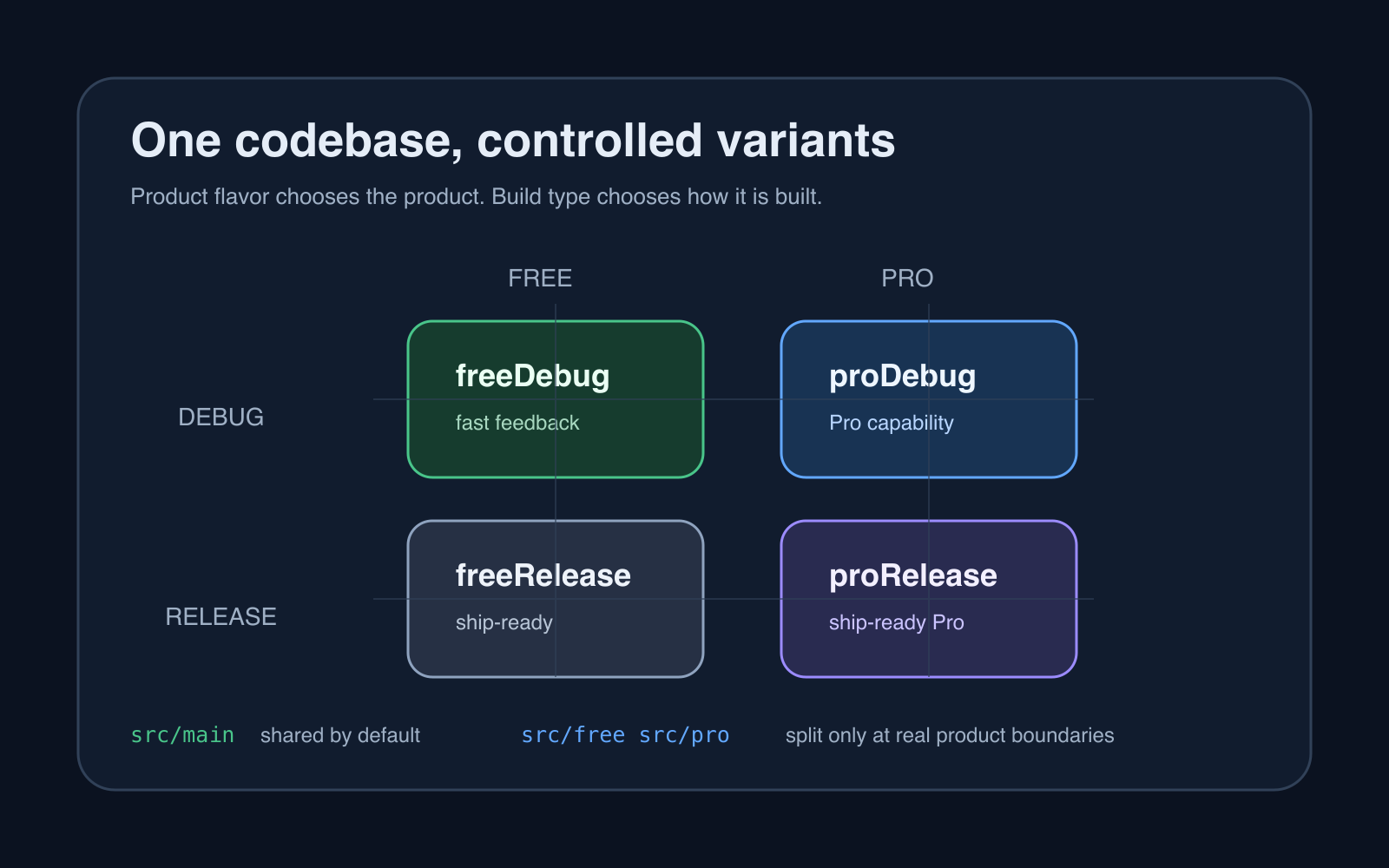
Android Flavor vs Build Type Golden Rules
- Product Flavor answers “What are we building?”: Features, branding, applicationId suffixes (
.pro,.free), API endpoints, and market-specific dependencies.- Build Type answers “How are we building it?”: Debuggable flags, signing configs, ProGuard/R8 minification, and debug loggers.
- Never Mix the Two: Avoid creating build types like
proDebugdirectly. Combine orthogonal dimensions:flavorDimensions += "tier"with flavorsfreeandpro, multiplied by build typesdebugandrelease.- Source Set Rule: Code in
src/pro/javacannot be referenced bysrc/free/java. Shared code and interfaces must remain strictly insrc/main/java.
Android product flavors are useful when one codebase must produce genuinely different products, such as Free and Pro editions, regional distributions, or branded variants. The maintainable pattern is to keep shared behavior in src/main, isolate only true product differences in flavor source sets, and use build types for engineering concerns such as debug and release.
That distinction matters. A flavor answers which product are we building? A build type answers how are we building it? Mixing those responsibilities is how a simple free and pro setup turns into a Gradle matrix nobody wants to touch.
This guide focuses on the architecture behind flavors, not just the syntax required to make Gradle compile.
Start with the variant equation
Android Gradle Plugin creates build variants from product flavors and build types. With two flavors and two build types, the basic matrix is:
free + debug   = freeDebug
free + release = freeRelease
pro  + debug   = proDebug
pro  + release = proRelease
The official Android build variants guide describes variants as combinations of build types and product flavors. That sounds simple, but the multiplication effect becomes important as the project grows.
Three flavor dimensions with three choices each and three build types can create dozens of variants. Before adding another dimension, ask whether it represents a real product axis or merely a runtime configuration value.
Give flavors and build types different jobs
A useful boundary looks like this:
| Concern | Product flavor | Build type |
|---|---|---|
| Free vs Pro capability | Yes | No |
| Different application ID | Often | Sometimes |
| Brand-specific resources | Yes | No |
| Debug logging | No | Yes |
| Minification | No | Yes |
| Release signing | No | Yes |
| Staging diagnostics | Usually no | Yes |
A common mistake is creating staging, production, free, and pro as peers in one flavor dimension. Environment and product tier are different axes. If staging exists to control debugging, endpoints, or release behavior, a build type or explicit environment configuration is often clearer.
Keep shared code in main
The healthiest flavor architecture has a large main source set and small flavor source sets.
app/
  src/
    main/
      kotlin/
      res/
    free/
      kotlin/
      res/
    pro/
      kotlin/
      res/
    debug/
      kotlin/
      res/
    release/
      kotlin/
      res/
Android’s build configuration documentation defines src/main as the source set shared by all variants, with optional source sets for build types and product flavors.
If most classes exist twice under src/free and src/pro, the flavor boundary is too large. Shared screens, repositories, domain models, networking, persistence, and design-system components usually belong in main.
Put only the behavior that is truly different behind the flavor boundary.
Prefer interfaces at flavor boundaries
Suppose the Pro edition enables cloud synchronization while Free remains local-only. Avoid sprinkling checks throughout the UI:
if (BuildConfig.IS_PRO) {
    showCloudSync()
}
That works initially, but repeated flags create product logic across unrelated layers.
A cleaner boundary is an interface in main:
interface SyncCapability {
    val available: Boolean
    suspend fun sync()
}
Then each flavor supplies its implementation.
src/free/kotlin/.../FlavorSyncCapability.kt
src/pro/kotlin/.../FlavorSyncCapability.kt
The rest of the app depends on SyncCapability, not on the flavor name. Dependency injection can bind the flavor-specific implementation at compile time.
This is similar to keeping state boundaries explicit in Bulk Edit in Android: A Safer Jetpack Compose Pattern. Compile-time variation is easier to reason about when the difference is represented by a narrow contract instead of conditionals scattered through the application.
Configure the flavor dimension intentionally
A minimal Kotlin DSL setup can look like:
android {
    flavorDimensions += "tier"

    productFlavors {
        create("free") {
            dimension = "tier"
            applicationIdSuffix = ".free"
            versionNameSuffix = "-free"
        }

        create("pro") {
            dimension = "tier"
            applicationIdSuffix = ".pro"
            versionNameSuffix = "-pro"
        }
    }
}
The Android documentation notes that flavors belong to a named dimension, and multiple dimensions combine to form variants. Dimension names are not cosmetic when local modules also publish flavored variants because variant-aware dependency matching uses them.
Name a dimension after the business axis it represents: tier, brand, or market is clearer than version1.
Decide whether variants are separate installed apps
applicationId determines Android’s installed application identity. If Free and Pro must coexist on one device or appear as separate store listings, they need different application IDs.
An applicationIdSuffix is convenient:
productFlavors {
    create("free") {
        applicationIdSuffix = ".free"
    }
    create("pro") {
        applicationIdSuffix = ".pro"
    }
}
Debug builds can receive another suffix:
buildTypes {
    debug {
        applicationIdSuffix = ".debug"
    }
}
That allows a developer to install a release-like build and a debug build side by side without replacing one with the other.
Do not change application identity casually after distribution. Treat it as a product decision, not a cosmetic Gradle setting.
Use resources for presentation differences
Flavor-specific app names, icons, colors, or strings usually belong in resources rather than Kotlin branches.
For example:
src/main/res/values/strings.xml
src/free/res/values/strings.xml
src/pro/res/values/strings.xml
A flavor can override a resource with the same name while shared resources remain in main.
This is a better fit for presentation differences because resource merging already has defined precedence. Android’s build variant documentation explains that variant, build-type, flavor, and main source sets are merged in priority order.
The same rule applies to manifests. Keep the shared manifest in main, then override only what differs.
Keep dependencies flavor-specific when they really are
If only Pro needs a large SDK, do not ship it in Free by default.
Gradle supports configuration-specific dependencies such as:
dependencies {
    implementation(libs.core)
    freeImplementation(libs.free.analytics)
    proImplementation(libs.cloud.sync)
}
This can reduce unnecessary code and keep product boundaries clearer. But dependency differences should reflect real capability differences. Using flavors merely to swap every library in the project creates a maintenance burden and makes shared testing less representative.
Control variant explosion early
Every new flavor dimension multiplies the number of potential variants.
Suppose you define:
tier: free, pro
market: global, enterprise
build type: debug, staging, release
That creates 12 combinations before adding anything else.
Some may be nonsensical. Android Gradle Plugin provides variant APIs that can disable unwanted combinations. The current Android guide shows androidComponents.beforeVariants for filtering combinations that should not exist.
Do not generate variants merely because Gradle can. A smaller valid matrix means faster CI, fewer signing paths, less test duplication, and fewer accidental releases.
Test the matrix, not just one favorite variant
Developers often spend most of the day on freeDebug or proDebug, then discover a release-only failure late.
At minimum, CI should exercise the variants that can actually ship.
For a simple Free/Pro application:
freeDebug      -> fast unit and UI feedback
proDebug       -> Pro-specific behavior
freeRelease    -> compile, shrink, package, smoke test
proRelease     -> compile, shrink, package, smoke test
Release variants matter because minification, signing, resource shrinking, and release-only configuration can expose failures that debug builds hide. If that happens, use a systematic workflow such as Android Release Build Crashes with R8: A Practical Debugging Workflow.
Flavor-specific behavior deserves flavor-specific tests, but shared domain behavior should remain tested once in the shared layer.
Watch for database and migration divergence
Flavors become risky when they persist different schemas while users can move between editions.
If Free and Pro are separate applications with separate application IDs, each owns its own app storage. If the product supports an upgrade path that transfers data between editions, that transfer is a migration problem and should be designed explicitly.
Avoid assuming that installing Pro automatically gives it access to Free’s private database. Android application sandboxing and application identity make that a separate data-transfer concern.
A safer model is to keep the core local schema compatible when possible and put Pro-only capability behind additional tables or services with explicit migration tests.
Avoid flavor checks throughout the domain layer
A warning sign is code like this appearing everywhere:
when (BuildConfig.FLAVOR) {
    "free" -> ...
    "pro" -> ...
}
That makes the product tier a hidden global dependency.
Prefer one of these boundaries instead:
- resource overrides for presentation;
- interface implementations for behavior;
- dependency-injection bindings for services;
- flavor-specific dependencies for truly exclusive SDKs;
- manifest placeholders for manifest-level configuration.
The goal is not zero flavor-specific code. The goal is to concentrate it where the difference belongs.
A practical decision checklist
Before introducing a new product flavor, ask:
- Does this represent a real product that must be built separately?
- Could the difference be a runtime remote configuration instead?
- Does it need a separate application ID?
- Can most implementation remain in
src/main? - Is the flavor boundary represented by resources or a narrow interface?
- Will another flavor dimension multiply CI and release work substantially?
- Which variants can actually ship?
- Are release variants compiled and tested in CI?
- Does persisted data remain compatible across edition changes?
- Can a developer explain the variant matrix without opening Gradle?
If those answers are clear, product flavors remain an architectural tool instead of becoming an accidental second application inside the same repository.
The durable rule is simple: share by default, split only at genuine product boundaries, and test every variant that can reach users.
Continue Exploring
You Might Also Like

Android elapsedRealtime and Monotonic Deadlines
Learn how to use Android elapsedRealtime and Kotlin cancellation to reject late coroutine responses during startup health checks, preventing stale data from overwriting UI state.

CameraX ZXing YUV rowStride pixelStride crop QR scanner
Learn how row stride, pixel stride, crop bounds, and rotation interact when feeding CameraX YUV frames into ZXing, and ensure proper proxy lifecycle management.

Fix Firebase Variant CI Configuration
Learn how the Google Services Gradle plugin matches build variants to configuration files, where variant-specific JSON files live, and how to verify that your CI pipeline exercises the intended Firebase project.