Firebase App Distribution for Android: A Practical CI Workflow
Build a repeatable Android pre-release pipeline with Firebase App Distribution, tester groups, release notes, CI gates, and variant-aware delivery.
Table of Contents16 sections
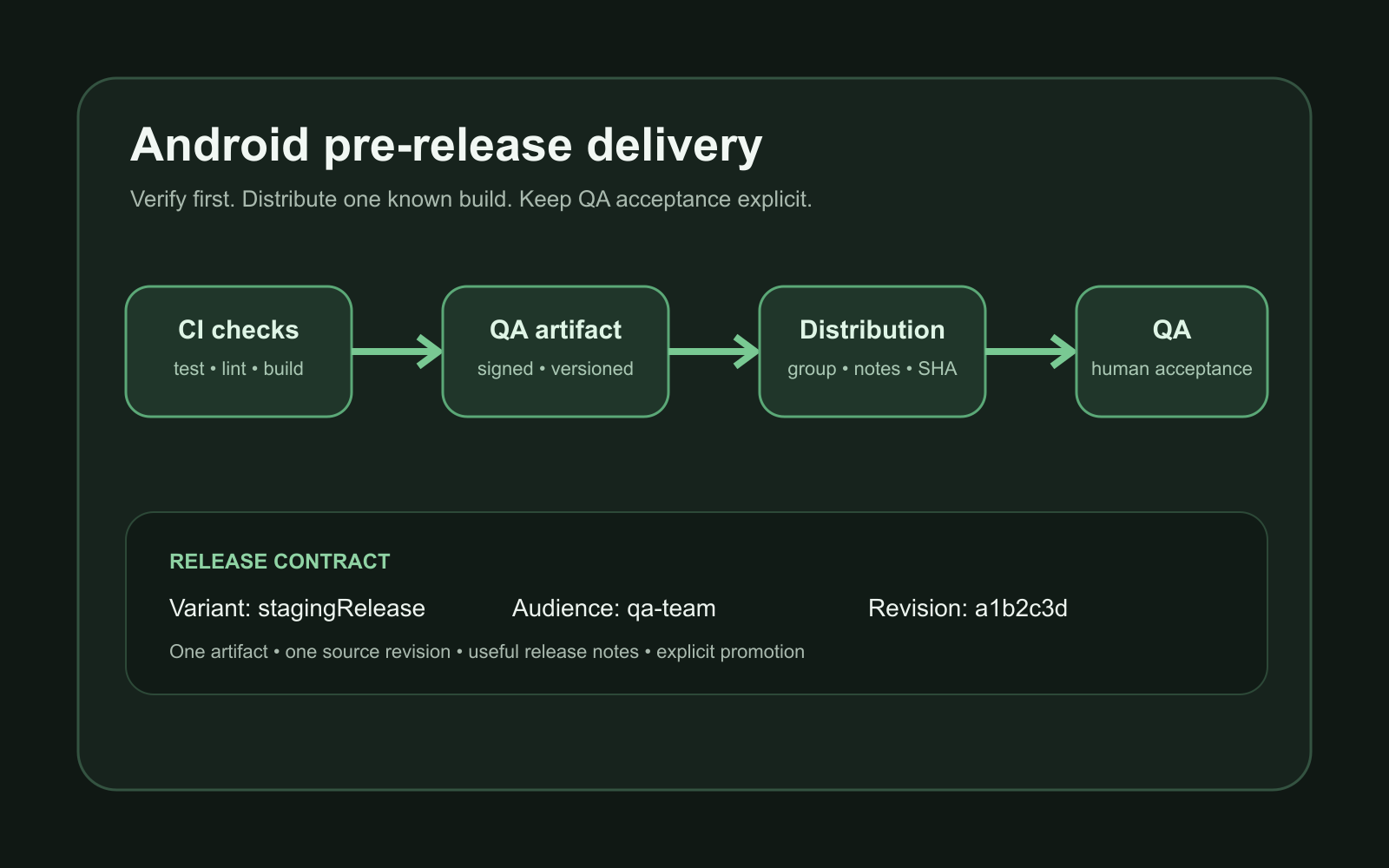
Firebase App Distribution is most useful when it is treated as a pre-release delivery stage, not as a manual upload page. A reliable Android workflow builds a known variant, runs automated checks, uploads only a successful artifact, attaches useful release notes, and sends it to a stable tester group.
That turns “please install this APK” into a repeatable release process.
The practical pipeline is:
commit
  -> CI checks
  -> build signed test artifact
  -> upload to App Distribution
  -> notify tester group
  -> collect feedback and stability signals
  -> promote only after acceptance
Quick Solution: GitHub Actions Step for Firebase App Distribution
Automate artifact delivery to QA testers in GitHub Actions using the official Firebase CLI action:
- name: Distribute APK to Firebase Testers
  uses: wzieba/Firebase-Distribution-Github-Action@v1
  with:
    appId: ${{ secrets.FIREBASE_ANDROID_APP_ID }}
    serviceCredentialsFileContent: ${{ secrets.FIREBASE_SERVICE_ACCOUNT_JSON }}
    groups: internal-testers, qa-team
    file: app/build/outputs/apk/release/app-release.apk
    releaseNotes: "Automated CI build #${{ github.run_number }} from ${{ github.sha }}"
Firebase supports Android distribution through the console, CLI, Gradle, fastlane, and REST API. For CI, the important design decision is not which button uploads the file. It is where distribution sits in the delivery pipeline and what must pass before a build reaches testers.
Put distribution after verification, not before it
A common anti-pattern is uploading every branch build immediately. That creates noise and makes testers responsible for discovering basic build failures.
A better pipeline separates fast engineering feedback from human acceptance:
pull request
  -> unit tests
  -> static checks
  -> build verification

main or release candidate
  -> repeat required checks
  -> assemble distributable variant
  -> upload
  -> QA acceptance
The distribution job should depend on the verification jobs. If tests or compilation fail, there is nothing useful to distribute.
This is the same principle behind Android Code Coverage in CI with JaCoCo: CI evidence should inform the next delivery step instead of becoming a report nobody uses.
Choose one distributable variant deliberately
Android projects often have several build variants. Do not make App Distribution implicitly mean “whatever APK CI happened to build.”
Choose a named pre-release target, for example:
qaDebug
stagingRelease
demoRelease
The exact name depends on your build matrix, but the contract should be explicit:
- which backend environment it uses;
- whether debugging tools are enabled;
- which signing configuration applies;
- whether minification matches production;
- whether the application ID can coexist with the production app.
Firebase’s Gradle distribution guide supports configuration by build type and product flavor. That makes distribution policy part of the build configuration instead of a tribal CI convention.
If your project already uses several editions, keep the variant matrix intentional. The architecture considerations in Android Product Flavors: A Practical Architecture Guide apply here too.
APK or AAB is a workflow decision
Firebase App Distribution supports Android pre-release artifacts, including APK and AAB workflows. The right choice depends on what you want testers to validate.
An APK is straightforward when the goal is rapid installation of a known build. An AAB is closer to a Play-oriented packaging flow, but Firebase notes that App Distribution integrates with Google Play internal app sharing for bundle delivery.
The important rule is consistency. If production failures often appear only in the release packaging path, a debug APK alone is weak evidence.
A useful strategy is:
| Stage | Artifact | Goal |
|---|---|---|
| Developer smoke test | debug APK | Fast feedback |
| QA candidate | signed APK or AAB | Feature and integration testing |
| Release candidate | production-like AAB | Packaging and release confidence |
Do not call a build “release candidate” if its signing, shrinking, backend, or packaging behavior is materially different from production.
Keep tester access group-based
Tester lists become painful when every pipeline command contains individual email addresses.
Firebase supports tester groups, and its CI/CD guidance recommends groups when the same set of testers receives multiple releases. A group becomes the stable delivery target while membership can change independently.
Conceptually:
CI pipeline -> qa-team
            -> product-review
            -> trusted-beta
That is cleaner than editing CI whenever someone joins or leaves the test pool.
It also creates a useful separation of responsibility. The pipeline decides which audience receives the build. Firebase tester management decides who currently belongs to that audience.
Make release notes useful to testers
“Bug fixes and improvements” is not enough for an internal build.
A useful release note answers three questions:
- What changed?
- What should the tester focus on?
- What known limitation should not be reported again?
For example:
Focus
- Retry order submission after reconnecting.
- Verify edited totals remain correct after reopening the screen.

Changed
- Reduced duplicate refresh calls after save.
- Added clearer offline feedback.

Known
- Export is still disabled in this candidate.
Firebase’s CLI supports inline release notes or a release-notes file. In CI, generating the file from a curated changelog, pull-request summary, or release-candidate description is easier to audit than embedding a long string in pipeline YAML.
Avoid dumping raw commit history directly into tester notes. Commit messages are written for developers, not necessarily for QA.
Prefer CI credentials over personal sessions
A developer laptop can authenticate interactively. CI should not depend on one person’s logged-in Firebase session.
Firebase documents service-account authentication for CI and also documents token-based CLI authentication. Whichever mechanism your environment uses, keep the credential in the CI secret store and expose it only to the distribution job.
Do not commit:
service account keys
Firebase tokens
keystores
keystore passwords
local environment files
Also scope the distribution job so untrusted pull requests cannot automatically gain access to release credentials.
The pipeline should be able to build untrusted code without automatically granting that code a path to distribution secrets.
Treat release notes and tester groups as inputs
A maintainable CI job makes its release inputs visible:
artifact path
Firebase app ID
tester group
release notes
variant name
A generic CLI step can then look conceptually like:
firebase appdistribution:distribute app-release.apk \
  --app "$FIREBASE_APP_ID" \
  --groups "qa-team" \
  --release-notes-file release-notes.txt
The official Firebase CLI guide documents the app identifier, tester/group selection, and release-note options.
Keep identifiers and audience configuration separate from the binary itself. That makes the same distribution step reusable across variants without hard-coding product-specific values into a shell script.
Do not distribute every successful commit
Automation makes it easy to over-distribute.
If ten commits land during a busy afternoon, ten tester notifications do not create ten times more feedback. They usually create uncertainty about which build should be tested.
Use a promotion rule such as:
merge to main
  -> build and verify

release-candidate tag or manual promotion
  -> distribute to QA
Another reasonable policy is one QA distribution per merged feature batch.
The exact trigger matters less than the invariant: a tester should know which build is currently worth their attention.
Separate build success from QA acceptance
A green CI job means the artifact satisfied automated checks. It does not mean the product behavior is accepted.
Model the states separately:
verified by CI
distributed
installed by tester
QA accepted
ready for release
Firebase can show tester invitation and download status for releases. That is useful operational evidence, but downloading a build is still not equivalent to approving it.
Keep the final promotion decision explicit.
Add Crashlytics without confusing the signals
Firebase App Distribution can work with Crashlytics so pre-release builds contribute stability information.
That is valuable because a tester may encounter a crash without writing a perfect reproduction report. But crash-free sessions are not a substitute for acceptance testing.
Use both:
human QA -> correctness, usability, workflow
Crashlytics -> runtime failures and stability evidence
A build can be stable and still implement the wrong behavior.
Design the pipeline for failed uploads
Distribution itself is a network operation, so the upload can fail even after the artifact has been built successfully.
Do not rebuild the application just because the upload endpoint temporarily failed. Preserve the verified artifact for the duration of the pipeline and retry the delivery stage separately when your CI system supports it.
That keeps two facts distinct:
artifact verification = passed
distribution attempt = failed
The same separation prevents a transient upload failure from being misreported as a broken Android build.
Keep an auditable release identity
A tester report such as “the last build crashes” is expensive when nobody can identify the binary.
Every distributed artifact should map back to a source revision. Useful identifiers include:
versionName
versionCode
Git commit SHA
CI run number
release-candidate label
You do not need to expose all of them in the UI. You do need enough information to answer:
Which exact source revision produced the binary this tester installed?
A short commit SHA in CI metadata or release notes is often enough to bridge the feedback back to the code.
A practical CI shape
A small Android project does not need an elaborate release platform. A dependable workflow can be only four jobs:
verify
  -> unit tests
  -> static checks

build_qa
  -> assemble chosen variant
  -> save artifact

distribute_qa
  -> authenticate
  -> upload verified artifact
  -> attach release notes
  -> target tester group

accept
  -> human QA outside CI
The first three can be automated. The fourth is intentionally human.
Firebase’s App Distribution overview explicitly supports repeated pre-release uploads and tester notifications, while its CI/CD best-practices guide recommends automating distribution to keep testers on the latest intended build.
Pre-release checklist
Before calling the workflow reliable, verify:
- CI distributes only after required checks pass.
- The pipeline names one explicit Android variant.
- The artifact is signed appropriately for testers.
- Tester access is managed through stable groups.
- Release notes describe what to test.
- Distribution credentials live only in CI secrets.
- Untrusted pull requests cannot access release credentials.
- Every distributed build maps to a source revision.
- Upload failure does not invalidate a verified build.
- QA acceptance remains separate from CI success.
- Production-like release candidates exercise production-like packaging.
The goal is not merely to automate an upload. It is to make every pre-release build identifiable, intentional, reproducible, and worth a tester’s time.
Continue Exploring
You Might Also Like

Android elapsedRealtime and Monotonic Deadlines
Learn how to use Android elapsedRealtime and Kotlin cancellation to reject late coroutine responses during startup health checks, preventing stale data from overwriting UI state.

CameraX ZXing YUV rowStride pixelStride crop QR scanner
Learn how row stride, pixel stride, crop bounds, and rotation interact when feeding CameraX YUV frames into ZXing, and ensure proper proxy lifecycle management.

Fix Firebase Variant CI Configuration
Learn how the Google Services Gradle plugin matches build variants to configuration files, where variant-specific JSON files live, and how to verify that your CI pipeline exercises the intended Firebase project.